HomeCourse ProScreen 180 Retractable Golf Simulator Screen

HomeCourse Wall Mount Kit
Wall Mount Kit (Required for 9'+ Ceilings) Learn More
$125.00
HomeCourse Wall Mount Kit

If you would like to mount your HomeCourse ProScreen 180 Retractable Golf Simulator Screen onto a wall, you must purchase this kit. It works in combination with the Ceiling Mount Kit which is included with the HomeCourse.


This item is recommended for tall ceilings 9ft or taller.

Go to Product Page
HomeCourse Side Netting front view with Landing Pad.
Side Netting Learn More
$199.00
HomeCourse Side Netting front view with Landing Pad.

HomeCourse Side Netting ensures that mishit golf balls never leave the hitting area. Side barriers are highly recommended while using your HomeCourse ProScreen 180 Retractable Golf Simulator Screen.

Go to Product Page
HomeCourse Pro Rack side profile.
Pro Rack Mount Learn More
$750.00
HomeCourse Pro Rack side profile.

The HomeCourse Pro Rack is the ultimate accessory that allows you to easily move your HomeCourse ProScreen 180 around your simulator studio or outdoors. Skip wall mounting or ceiling mounting your ProScreen 180 and experience ultimate mobility and use of your ProScreen 180 wherever you can accommodate 8'6" height.

The HomeCourse Pro Rack is favored by golf enthusiasts that require their ProScreen 180 to be moved with ease and while not using it in a stationary, fixed environment.

Go to Product Page
HomeCourse Landing Pad with transparent net and framing.
Landing Pad Learn More
$250.00
HomeCourse Landing Pad with transparent net and framing.
The HomeCourse Landing Pad is a 9'x5' artificial grass surface meant to soften the landing of a ball as it drops down from the HomeCourse ProScreen 180 Retractable Golf Simulator Screen.

It is not meant to be used as a hitting surface.
Go to Product Page
American Express Apple Pay Discover Meta Pay Google Pay Mastercard PayPal Shop Pay Venmo Visa

Fast & Free Shipping

Enjoy fast and free shipping (exclusions apply) on products from leading manufacturers!

Price Match Guarantee

Find a competitor with a lower price and we will match or beat it, no questions asked!

Based in the U.S.A.

Expert level sales and support team proudly based in the U.S.A.

#1 Destination for Indoor Golf

Largest selection of indoor golf equipment from leading manufacturers.

The HomeCourse Golf ProScreen 180 is a retractable golf simulator screen and enclosure. The fully retractable screen allows you to turn virtually any space into an indoor golf simulator studio or practice area with the click of a button.

The system can be wall or ceiling mounted and is powered by a lithium-ion battery with a fully wireless design utilizing a remote control. Made from ballistic-grade materials, the ultra-wide projectable screen can absorb the impact of a golf ball hit by a full-swing shot at point-blank distance.

Built for extended durability, the ProScreen 180’s screen ingeniously flexes at the bottom so the ball rolls back to your feet. All you need is enough room to swing freely, and you’re good to let it fly.

You have the option to fully extend the arms to create a 16'x9' projectable impact screen, or simply angle out the arms to create side nets that capture errant shots. The ProScreen 180’s Pro Arm side nets can be extended to create an ultra-wide 14ft projectable area — ideal for projectors that cast a 16:9 ratio.

The space saving design allows anyone to convert a room or a garage into a sports bay without having to fully dedicate that space to the activity. When finished, simply fold in the arms, and press the up button on the remote and your swing studio is packed away.

*If you would like to wall mount your Proscreen 180, you will need to purchase the HomeCourse Wall Mount Kit.


What's Included

  • Retractable screen/enclosure
  • Ceiling mount kit
  • Charging cable
  • Remote control
  • Easy reach pole

Specifications & Requirements

The HomeCourse Golf ProScreen 180 must be installed at approximately 8 1/2 feet from the floor. It’s okay to have a little bit of slack so the ball can roll towards you after you hit it. You can stand as close to the screen as you can where your club won’t hit the ballistic-grade screen or anything behind you (we recommend 10 to 12 feet front to back). Choose a mounting option and you can turn virtually any space that’s 8’6" H x 10’ W x 8’ D into a home golf experience.

Dimensions:

  • Metal Housing Length: 8'
  • Pro Arms Length: 3'
  • Screen Height: 8'
  • Width with Pro Arms Extended: 13'8"


Minimum Space Requirements:

  • Minimum Distance from Ceiling: 6"
  • Minimum Mounting Distance from Wall: 18"
  • Minimum Overall Space: 13'6"W x 8'6"H x 13'D


HomeCourse Golf ProScreen 180 dimensions and requirements.
Recommended Space Requirements:

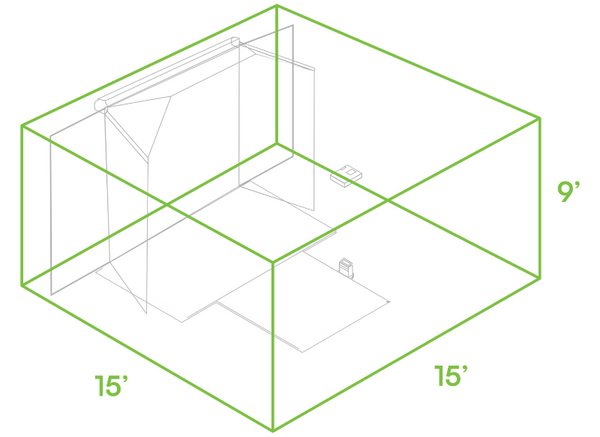
  • Recommended Overall Space: 15'W x 9'H x 15'D


HomeCourse ProScreen 180 Recommended Space Requirements

Installation Video

Speak with a Golf Simulator Expert

We understand that designing the perfect golf simulator can be a complex task. Get in touch with one of our Golf Simulator Experts for a free consultation, or to address any questions that you might have.

Customer Reviews

Search