



The TruGolf LaunchBox DIY Golf Simulator Package is the ultimate solution for customizability and affordability in a golf simulator package. The package includes the TruGolf LaunchBox Launch Monitor, Carl's Place DIY Golf Simulator Enclosure Kit with Premium Impact Screen in your preferred size, and choice of hitting mat and projector.
The LaunchBox is engineered with dual high-speed cameras to deliver precise ball data in real time, whether you’re training indoors or outdoors. Compact, sleek, and intuitive, it provides seamless access to practice ranges and full-course simulation on both PC and iOS devices, making it the ideal tool for golfers of all levels looking to sharpen their skills.
What's Included:
Optional Accessories (Not Included):
Precision with Dual Cameras
The system uses dual high-speed cameras to accurately measure ball data and instantly display the results.
Versatile Indoor/Outdoor Use
Optimized for indoor use but also works on range mats outdoors, offering a comprehensive practice experience.
Seamless Connectivity
Includes WiFi connection, onboard display, and LED status indicators for smooth and intuitive operation.
Realistic Course Play
Comes with E6 CONNECT Home, providing access to various game modes such as Stroke Play, Scramble, Best Ball, and more.
TruGolf LaunchBox Launch Monitor
LaunchBox by TruGolf is designed with a focus on accuracy and user convenience. Whether you're looking to improve your game indoors or outdoors, this versatile launch monitor is equipped with dual high-speed cameras to capture precise ball data in real time. With its sleek design and intuitive interface, the LaunchBox ensures a seamless experience for both beginners and advanced players.
Compatible with PC and iOS, LaunchBox provides access to Course Play and multiple practice ranges. Whether you're practicing on the range or playing a full course, this launch monitor is an ideal tool for refining your skills and elevating your game.

Carl's Place C-Series DIY Golf Simulator Enclosure Kit with Premium Impact Screen
Offering a seamless, turf-to-screen experience with a borderless bottom, the Carl's Place C-Series DIY Golf Simulator Enclosure Kit with Premium Impact Screen enables you to be fully immersed in your practice sessions. Choose from 6 sizes for maximum customization and to turn virtually any space into a golf simulator studio.
The Black Nylon Enclosure, Steel Corner Fittings, and Ball Bungees with Zip Ties are included with your DIY Enclosure Kit.
Add the Carl's Place Pipe Framing Kit, Foam Insert Kit,
Safety Baffle, Back Cover Kit, Back Cover Pipe Kit, and Net Wall Extensions to allow for a streamlined assembly process and for an added layer of customization.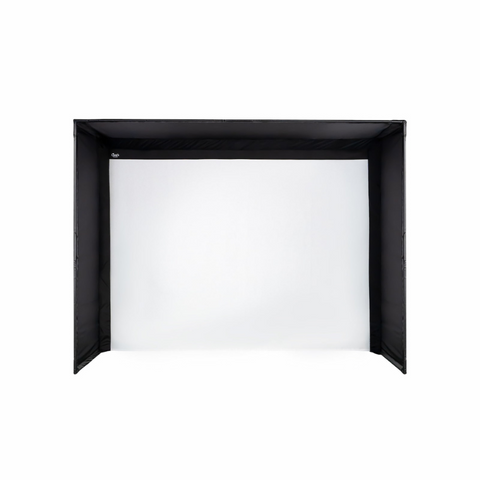
Carl's Place HotShot Golf Hitting Mat
Choose from the Carl's Place 4'x5' or 5'x8' HotShot Golf Hitting Mat to complete your practice package. Both the 4'x5' and 5'x8' are designed to accommodate right and left-handed players and feature a hitting strip that allows for swift replacement after you have worn out this section on your mat. Engineered to be joint-friendly and anti-fatigue, the HotShot Hitting Mats enable you to enjoy hours of play without discomfort.

Choice of BenQ Projector
Choose from the BenQ AH700ST (laser-based) or AK700ST (laser-based 4K) Projector depending on your budget. The AH700ST offers 4,000 lumens with automatic adjustment capabilities that quickly align the image to your impact screen, making it perfect for fast and hassle-free golf simulation setups.
Upgrade to the AK700ST to experience 4K graphics and all of the same benefits as the AH700ST including automatic adjustment capability. Both the AH700ST and AK700ST feature a 0.69-0.83 throw ratio that allows the projector to be mounted slightly behind the tee area which is optimal for most standard golf simulator setups.
Onboard Display Data Measured:
In-Game Data Measured:
TruGolf LaunchBox:
Carl's Place C-Series DIY Enclosure Specifications:
Carl's Place HotShot Golf Hitting Mat:
E6 CONNECT PC Requirements:
E6 CONNECT iOS Requirements:
Q: What is included with the TruGolf LaunchBoxDIY Golf Simulator Package?
A: TruGolf LaunchBox Launch Monitor,
Carl's Place DIY Golf Simulator Enclosure Kit with Premium Impact Screen, choice of Carl's Place HotShot Golf Hitting Mat, choice of BenQ Projector.
Q: How far away should I stand from my impact screen?
A: For the safety of both the golfer and the screen, we recommend standing a minimum of 10-12 feet away from the screen.
Q: How much buffer space do I need around my enclosure?
A: For Carl's Place DIY Enclosure Kits, we recommend you give yourself an absolute minimum of 2-3 inches buffer space from the height you have available. For width, subtract 4-6 inches from your available space to allow 2-3 inches of clearance on each side. Keep in mind that C-Series enclosures include a rear backset fitting that adds 8.25 inches to the depth, creating a built-in buffer for safety.


Documents:
We understand that designing the perfect golf simulator can be a complex task. Get in touch with one of our Golf Simulator Experts for a free consultation, or to address any questions that you might have.


