The FlightScope Mevo+ Launch Monitor is the ultimate indoor and outdoor companion for golf enthusiasts, coaches, instructors, and fitters alike. This advanced launch monitor and simulator, powered by FlightScope Fusion Tracking technology, offers unparalleled golf performance insights for an enhanced practice and play experience.
FlightScope's patented Fusion Tracking technology combines 3D Doppler tracking radar and high-speed image processing to deliver precise and consistent data for every shot, whether you're hitting indoors or outdoors.
Experience a new standard of accuracy and reliability with the Mevo+'s comprehensive suite of 20 full swing and short game data parameters, designed to elevate your game and entertainment.
Mevo+ includes ownership of 12 courses and 17 practice ranges included at no extra cost, along with compatibility for iOS and PC, Mevo+ brings simulation and gaming to a whole new level of convenience and enjoyment.
What's Included with Mevo+:
-
OPEN BOX
FlightScope Mevo+ Launch Monitor
- E6 CONNECT for iOS and PC
- FS Golf for iOS and Android App
- FS Golf for PC Customizable App
- FS Skills App
- FS Multicam
- Power Adapter & USB Charging Cable
- Mevo+ Protective Case
- Mevo+ Kickstand
- Reflective Stickers for Indoor Use
Features of Mevo+:
- Access to 20 Data Parameters
- 12 E6 CONNECT Simulated Golf Courses for both iOS and PC platforms included
- Free software includes FS GolfApp, FS Skill App, and FS PC Software
- Enhanced stability with an upgraded kickstand
- Long-lasting battery life of up to 3 hours
- Unique and cost-effective upgrade options available: Pro Package and Face Impact Location
Features
Receive E6 CONNECT with Your Purchase
Unlock a richer golf simulation experience with the inclusion of E6 CONNECT for iOS and PC, featuring trusted FlightScope performance data. Gain access to a selection of 12 renowned golf courses and 17 practice ranges, ensuring endless opportunities for improvement and enjoyment.

FlightScope Tracer
With the FlightScope Tracer feature, you can capture and view precise 3D shot trajectories with data overlays on your videos, giving your teaching, club fitting, and practice sessions the appearance and feel of a live TV broadcast.
*Currently, this feature is only available on iOS.
 iOS and Android Compatibility
With FS Golf for iOS and Android, access a comprehensive app for teaching, fitting, and practicing, featuring customizable data margins, trajectory views, and combined data and video capabilities.
 FS Golf for PC - Included with Purchase
Explore FS Golf for PC, included with your Mevo+ purchase, offering complete customization options, including up to four views at once, tables with averages, and split-screen functionality for simplified analysis.
 Level Up Your Game with FS Skills
Take your game evaluation to the next level with FS Skills, featuring advanced combine assessments and customized challenges to improve accuracy and skill level.
 FlightScope Multicam
Utilize FlightScope Multicam to automatically record and sync videos from multiple cameras, overlaying data parameters for a comprehensive teaching and fitting tool. Enhance your sessions with the ability to draw lines and circles on videos and share them directly with clients.

What's Included
What's Included with Mevo+:
-
OPEN BOX
FlightScope Mevo+ Launch Monitor
- E6 CONNECT for iOS and PC
- FS Golf for iOS and Android App
- FS Golf for PC Customizable App
- FS Skills App
- FS Multicam
- Power Adapter & USB Charging Cable
- Mevo+ Protective Case
- Mevo+ Kickstand
- Reflective Stickers for Indoor Use
E6 CONNECT Included Features:
Golf Courses:
- Pebble Beach - CA, USA
- Old Course - St Andrews Links - Scotland
- Bethpage Black - NY, USA
- Bay Hill - FL, USA
- Harbour Town Golf Links - SC, USA
- The Greenbrier - WV, USA
- The Belfry - Sutton Coldfield, England
- Banff Springs - Alberta, Canada
- Panther Lake - FL, USA
- Wade Hampton - NC, USA
- Olso Golf Club - Norway, Europe
- Aviara - CA, USA
Practice Ranges
- 17 practice ranges with various layouts and skill challenges
*Additional courses and content available for purchase or subscription on mobile and PC.
What's Measured
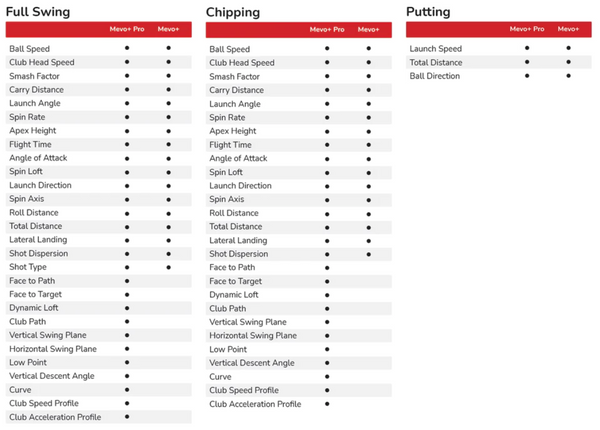
Mevo+ provides 20 full swing, chipping, and putting data parameters to create the ultimate golf improvement and entertainment suite.
Space Requirements
Mevo+ Full Swing Setup Requirements
- Minimum Distance Tee to Impact Screen: 8'
- Recommended Distance Tee to Impact Screen: 8'-13' ball flight
- Mevo+ Sensor to Tee Required Distance: 8'
Mevo+ Short Game Setup Requirements
Putting:
- Putting Minimum Distance Tee to Cup: 6'
- Putting Maximum Distance Tee to Cup: 30'
- Mevo+ Sensor to Tee Required Distance: 7'
*Flat surface required, no aluminum stickers
*12 degree tilt required
Limited Flight Chipping:
- Limited Flight Chipping Minimum Distance Tee to Target: 8'
- Mevo+ Sensor to Tee Required Distance: 8'
*Aluminum stickers not required if using Titleist RCT golf balls.
Full Flight Chipping:
- Full Flight Chipping Minimum Distance Tee to Target: 6'
- Full Flight Chipping Maximum Distance Tee to Target: 50 yd max.
- Mevo+ Sensor to Tee Required Distance: 8'
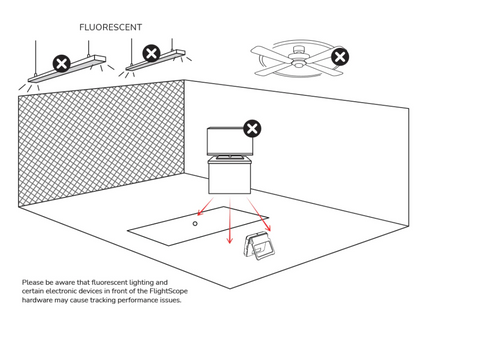
Environment Requirements:
- Required: Unobstructed area to swing with no objects in front of golfer
- No fluorescent lights in front of the Mevo+
Specifications
Mevo+ Specifications
- Product Dimensions: 4.6"H x 1.2"D x 6.8"W
- Weight: 16 ounces
- Batteries: 1 Lithium Polymer battery required (included)
- Battery Life: Up to 3 hours
System Requirements
iPhone & iPad Requirements:
- iOS 16 or later
- Bluetooth LE 4.0 - Supports UART/Serial Port Emulation service with RX and TX characteristics
Android Requirements
- Android 6.0 or later (devices made in 2015 or later)
- Bluetooth LE 4.0 - Supports UART/Serial Port Emulation service with RX and TX characteristics
Resources
Documents:
Returns & Refunds
Return Policy:
If you need to return the Mevo+, you may do so within 7 days. Products eligible for return must be like new, undamaged, and must contain all original product packaging and accessories.
Restocking Fee:
Any outright returns will incur a 15% restocking fee. Customer is also responsible for any shipping costs throughout the return process.
Standard Return Process:
- Please contact Indoor Golf Outlet by emailing us at
orders@indoorgolfoutlet.com
to initiate the return.
- Reference your 4-digit order number and provide photos of all the items being returned.
- All returns must be approved by the manufacturer. Upon acceptance of the return, we will provide you with the return shipping address, or a pre-paid shipping label.
- Once your items are received in and inspected, we will initiate your refund to your original payment method.
Cancelations:
Orders must be canceled within 24 hours to avoid a 3% merchant processing fee. If you need to cancel an order, please do so immediately by emailing
orders@indoorgolfoutlet.com. If an order has left the warehouse, the customer is responsible for return shipping cost as well as the 3% merchant processing fee.
If an order is canceled after it has shipped, it will be treated as a regular 30-day return and will be subject to return shipping cost and restocking fees that are the responsibility of the customer.